Utilizing Microsoft OneNote with Lync
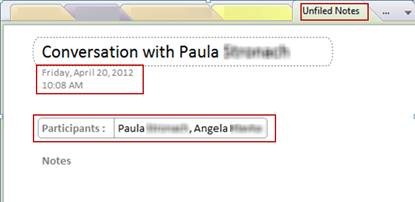
Using OneNote in conjunction with Lync often increases meeting productivity. OneNote captures the names of participants, as well as the date and time of the Lync meeting or conversation. Additionally, for scheduled Lync Meetings the OneNote files can be linked to the meeting so that they are attached to the invite. This is especially handy tool for notes in recurring meetings. Outlined below are the methods for both adhoc and scheduled meetings
Lync Adhoc Meetings – Utilizing OneNote:
After all participants have joined the Lync conversation or online meeting, select Take Notes Using OneNote from the Actions menu in the Lync conversation window.

A new, unfiled OneNote page will open, and the online meeting or conversation subject will automatically appear in the page title area. Rename and file as per your favorite naming conventions. Current participants will be listed, followed by an area for taking notes.

All OneNote tools are available when taking notes using OneNote during a Lync conversation or online meeting. So if you want to add screen captures, record audio, record video, files, notes and more it is up to the task.
Lync Scheduled Meetings – Utilizing OneNote:
Prior to scheduling the meeting set up the desired OneNote tab. Ensure you have made your meeting a Lync meeting. When scheduling the meeting in outlook you can link a OneNote tab to the meeting. With outlook meeting open, choose the link to OneNote Icon.

Choose the OneNote tab you created prior to setting up the meeting. This can include agenda, objectives and any material appropriate for the specific meeting.
Note: You can also add a file during or after the meeting.

OneNote will be populated by the appropriate information. If it is a recurring meeting your previous notes will be there.

We hope you find using OneNote in combination with Lync as productive as we do.
This is great! Verification is always needed in Project Management and OneNote is an invaluable tool to start with. Now it is priceless!